eBay auctions ending soon: how to find overlooked auctions and set a fair maximum bid
Most eBay auctions end close to market value, because enough people see them. The ones that end cheaply are the ones too few people saw: badly titled, badly timed, or buried in a category nobody browses. This guide explains how auction timing works, how to find the auctions ending soon with few or no bids, how to work out what to bid, and how to place that bid yourself in the final moments.
By Andrew Galvin, Founder of eSnipe10 min readUpdated
On this page8 sections
- 01First, a note on what this site does and does not do
- 02Why some auctions end with few or no bids
- 03How eBay auction timing works
- 04Finding auctions ending soon with few or no bids
- 05Researching a fair maximum bid
- 06How eBay's bidding system decides the price
- 07Manual last-minute bidding: a strategy you carry out yourself
- 08Using alerts to find auctions at listing time
First, a note on what this site does and does not do
Because of the name, it is worth being clear before anything else. eSnipe sends alerts about new eBay listings that match your searches. It does not bid, does not snipe auctions and does not buy anything on your behalf, and it never asks for your eBay login. Everything in this guide about bidding describes things you do yourself, in your own eBay account. If you are looking for an automated sniping service, that is a different product from a different company, and our page on eSnipe.app versus eSnipe.com explains the difference.
What alerts can do for auctions is tell you about one the moment it is listed, which, as you will see, is also the moment its end time is fixed. That turns out to be a useful head start.
Why some auctions end with few or no bids
An auction's final price depends on how many serious bidders see it before it ends. When two people both want an item and both bid up to what it is worth to them, the price lands near the market. When only one person is paying attention, it can end at the opening bid. The auctions worth hunting are the ones where something kept the second bidder away.
The usual culprits are visibility problems rather than the item itself. A vague or misspelled title means the auction does not appear in the searches buyers run. Poor photos or the wrong category means those who do see it scroll past. A high opening bid discourages early bids, and listings with no bids get less attention than ones with activity. And timing matters: an auction that ends in the middle of the night for most of its likely buyers, or over a holiday, has fewer people around at the moment that counts.
Not every quiet auction is an overlooked bargain. Some have no bids because the opening price is already at or above what the item sells for, or because experienced buyers have spotted a problem you have not. Part of the skill is telling the difference, which comes down to research rather than instinct.
- Titles that miss the words buyers search for, including misspellings.
- Few, dark or blurry photos, or the wrong category.
- An opening bid set high enough to discourage the first bid.
- End times when most likely buyers are asleep, working or on holiday.
- Reserve prices that put off bidders who cannot see the threshold.
How eBay auction timing works
An eBay auction runs for the duration the seller chooses, commonly anything from one day to ten, and it ends at the same time of day it started. A seven-day auction listed at 2:47 in the morning ends at 2:47 in the morning a week later. Sellers can schedule a start time in advance, and many deliberately aim for evenings or Sunday nights when lots of buyers are online. Sellers who do not think about it list whenever they finish photographing, which is how auctions come to end at odd hours.
That has a useful consequence. The end time of an auction is known the moment it goes live. If you see a new auction listed at an awkward hour, you already know it will finish at an equally awkward hour, days from now, and you can plan for it. Checking the end time in your own time zone is important, especially when the seller is in another country; eBay shows the end time and a countdown on the listing.
Two other mechanics are worth knowing. If a seller offers a Buy It Now price on an auction, that option generally disappears once the first bid is placed, or once a reserve is met on reserve auctions, so an auction with a BIN option and no bids can sometimes be bought outright before anyone bids. And eBay auctions end at a fixed time with no extension for late bids, which is why bids placed in the closing seconds can win.
Finding auctions ending soon with few or no bids
eBay gives you the basic tools. Search for the item or category, filter the buying format to Auction, and sort by Time: ending soonest. Results then show the auctions closest to finishing at the top, with the current price and bid count on each. Scanning that list for listings with zero or one bid, at prices well below what the item usually sells for, is the classic ending-soon hunt.
The difficulty is that the obvious searches are the ones everyone runs. An auction that appears for “nintendo switch” sorted by ending soonest will be seen by plenty of last-minute bidders, which is why it rarely ends cheaply. The overlooked auctions are the ones that do not appear in the obvious search. Try the misspellings and generic descriptions an inexperienced seller would use, browse a category rather than searching a model, and search titles and descriptions together via Advanced Search for items whose titles say little.
Time of day helps a little. Running the ending-soonest search late at night or early in the morning shows you auctions finishing when fewer people are watching, and those are somewhat more likely to end with a single bidder. But last-minute bidders and automated sniping services do not sleep, so a well-titled auction for a popular item will usually find its price whatever the hour. The time-of-day effect is real but smaller than the visibility effect.
Researching a fair maximum bid
Decide your maximum before the auction ends, not during it. The price you are prepared to pay should come from what the same item, in the same condition, has sold for recently. Search it, switch on the Sold items filter, and look at the middle of the last month or two of sales, ignoring the outliers at both ends. Compare carefully: a working, complete example is worth much more than one with missing parts, and the listing in front of you may differ from the comparables in ways that matter.
Then do the sums on the total. Add the shipping cost and any import charges, and consider whether you need a margin. For something you want to keep, a maximum somewhat below the typical sold price leaves you happy whether you win or lose. For something you intend to resell, work backwards from the resale price after selling fees, postage and your time, and use eBay's current fee page rather than a guess for the fee part. Write the number down. The point of researching in advance is that you never revise it upward in the final minute, which is precisely when people overpay.
Finally, read the listing as closely as you would a Buy It Now purchase. Check the seller's feedback, the photos, the condition notes and the returns policy. An auction ending cheaply because of a hidden fault is not a bargain. And be cautious with a bid history in which one low-feedback account keeps outbidding everyone in small steps; shill bidding is prohibited on eBay, but it happens, and your fixed maximum is the best defence against it.
- Start from recent sold prices for the same item and condition.
- Include shipping and any import costs in your total.
- Leave a margin: below typical sold for keeping, more for reselling.
- Write the maximum down and never raise it in the closing minute.
How eBay's bidding system decides the price
eBay uses automatic bidding, often called proxy bidding. When you place a bid, you are telling eBay the most you are willing to pay. eBay then bids on your behalf only as much as needed to keep you in the lead, in steps called bid increments, up to your maximum. If someone else enters a higher maximum, they take the lead and eBay raises their bid just past yours. The increment depends on the current price, and eBay publishes the increment table in its help pages.
Two consequences follow. First, entering your true maximum once is enough; eBay does the incremental bidding for you, and there is no advantage in bidding a little at a time. Second, the winner usually pays a little more than the second-highest maximum, not their own maximum. That is why a careful buyer with a high maximum can win an auction at a modest price if nobody else valued it highly.
Reserve prices sit on top of this. On a reserve auction the seller has set a hidden minimum, and the item does not sell unless bidding reaches it. The listing says whether the reserve has been met. If it has not, bidding your maximum will reveal whether your maximum clears the reserve, which is useful information but uses up your bid.
Manual last-minute bidding: a strategy you carry out yourself
Many experienced buyers place their only bid in the final seconds of an auction. The reasoning is that an early bid reveals interest and gives other bidders time to respond, sometimes by raising their own maximums; a bid placed at the very end gives them no time to react. Because of proxy bidding, a single last-moment bid of your true maximum is all you need. eBay's auction format allows bids up to the closing second, and you can do this entirely by hand.
Done manually, it needs a little preparation. Be signed in on a reliable device and connection a few minutes before the end, with the listing open and your maximum already decided. Enter the amount and get to the confirmation step early, then submit it with enough time left for the page and network to respond; leaving it to the last two or three seconds risks missing the end altogether, especially on a phone. Refresh to confirm the outcome rather than assuming. If you lose because someone else's maximum was higher, that is the system working: they valued it more than you did.
Some people use third-party sniping services to place the bid automatically. That is a separate choice with its own trade-offs, and eSnipe is not one of those services. Whether you bid early, bid late or use another tool, the principle is the same: one honest maximum, researched in advance, and no chasing.
Using alerts to find auctions at listing time
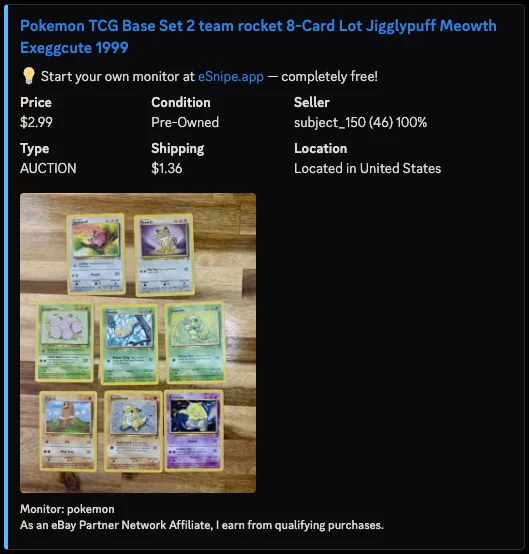
The sort-by-ending-soonest approach finds auctions at the last moment, when everyone else hunting the same way is looking too. The other approach is to find them at the first moment. An alert for new auction listings tells you about an auction as soon as it goes live, which gives you its full duration to research, ask the seller questions and set a maximum, and tells you immediately whether its end time falls at a convenient or awkward hour.
In eSnipe you can set a monitor's listing type to Auction, add the item's keywords and any misspelled variants as separate monitors, set a price range, and add negative keywords for parts and accessories. Alerts go to Discord or your phone, typically within about a minute of the listing appearing. eSnipe does not send reminders as an auction nears its end, so when an alert lands on an auction you care about, add it to your eBay watch list or put the end time in your calendar. eBay's own watch list can notify you before watched items end.
From there the work is yours: research the price, decide your maximum, and place your bid when you choose. An alert at listing time does not win the auction, but it turns a last-minute scramble into a decision you had days to make.
Questions about eBay auctions ending soon
How do I find eBay auctions ending soon with no bids?
Search the item or category, set the buying format to Auction and sort by Time: ending soonest, then scan for zero or one bid. Misspelled titles, broad category browsing and late-night searches surface auctions fewer people are watching.
Does eSnipe bid or snipe eBay auctions for me?
No. eSnipe only sends alerts about new listings that match your searches. It never bids, snipes or buys, and it does not need your eBay login. Any bidding is done by you in your own eBay account.
How much should I bid on an eBay auction?
Base your maximum on recent sold prices for the same item and condition, add shipping and any import costs, and leave yourself a margin. Decide it in advance and enter it once; eBay's automatic bidding handles the increments.
Is bidding at the last second allowed on eBay?
Yes. eBay auctions accept bids until the scheduled end time, and auctions do not extend for late bids. Leave yourself a few seconds of margin when bidding manually so connection delays do not cause you to miss the end.
Why do some eBay auctions end at strange times?
An auction ends at the same time of day it was listed, after the duration the seller chose. A seller who lists at 3am without scheduling gets an auction ending at 3am, when fewer buyers are watching.